Guides
-
Which journey map should you use?
Choosing the right journey map for website user experience
Learn how different mapping styles identify friction points and help teams visualise the paths users take to complete tasks on your digital platforms.
Three key methods used in this
guide
User research
information architecture
Interaction & flow design
Defining the Digital Path
Every interaction on a website is part of a larger story. However, many teams struggle to see where that story breaks down. They might notice a high drop-off rate on a specific page but fail to understand the emotional or technical hurdles that caused it.
Improving the website user experience starts with visibility. By using specific journey mapping frameworks, we can move away from assumptions and start documenting the "raw truth" of how people navigate your services. Without these visual guides, digital improvements are often just guesswork that fails to address why people give up or call for help instead.
The Four Essential Mapping Frameworks
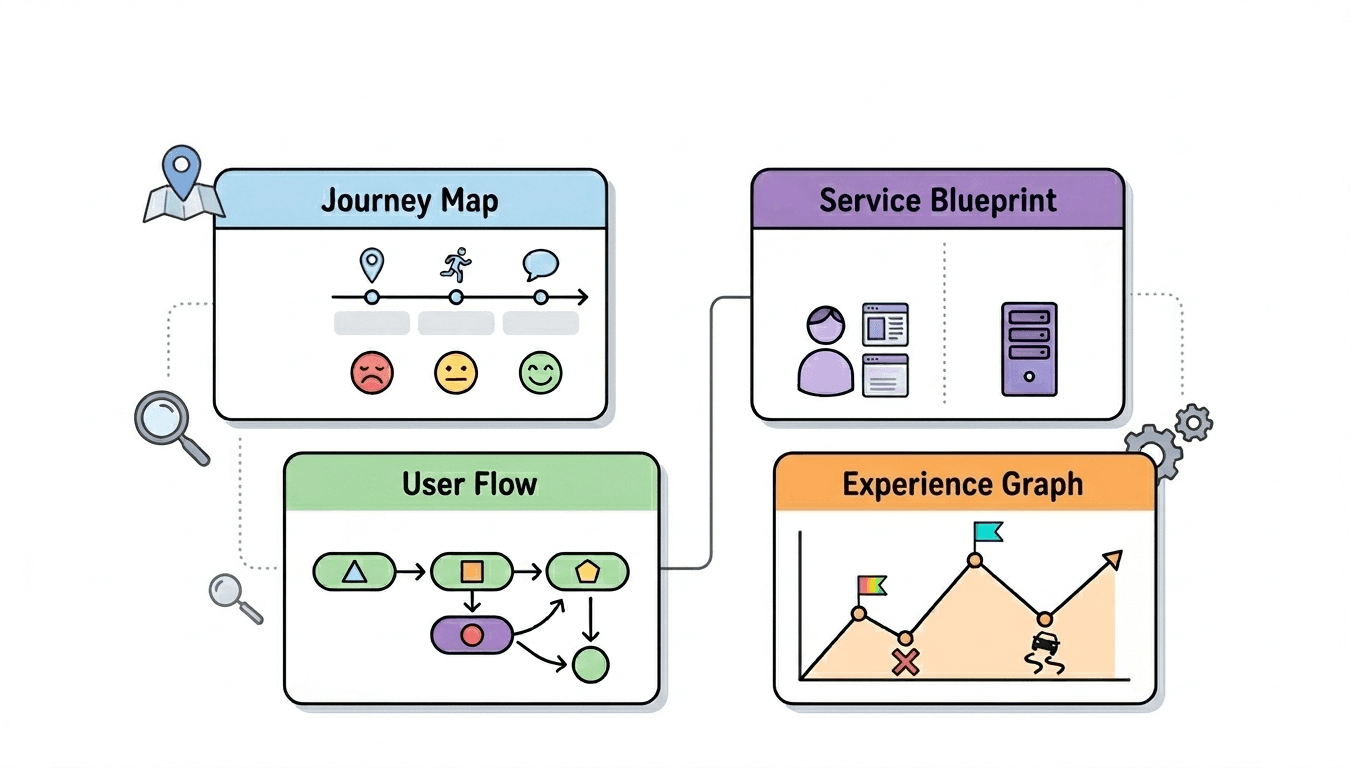
Based on the specific problem you are trying to solve, you must choose a map that provides the right level of detail. The following frameworks help align your team on where the interface is failing and where it needs to go.
1. Customer Journey Maps
This is the foundational tool for understanding the "big picture." It tracks a person’s experience over a chronological timeline, specifically highlighting their touchpoints, actions, and thoughts.
The Problem: Users feel overwhelmed or annoyed during a specific phase—like a complex registration—but the data doesn't explain the "why."
The Solution: By plotting the emotional arc (using sentiment icons) against the steps, we see exactly where the interface fails to support the user's mental state. It identifies the "pain points" and "moments of truth" where a user either succeeds or leaves.
2. Experience Maps
While a journey map focuses on a specific product, an experience map is broader. It looks at the entire human experience within a certain domain, often before they even arrive at your website.
The Problem: You are designing a solution for a problem you don't fully understand, or you are missing the context of what the user is doing before they search for your service.
The Solution: This map visualises the end-to-end experience, identifying the "roadblocks" and "hurdles" people face in their daily lives. It helps teams design features that actually fit into a person's real-world routine.
3. Service Blueprints
A journey map shows what the user sees "above the surface" (the front stage). A service blueprint maps that journey against the internal systems, staff actions, and support processes "below the surface" (the backstage).
The Problem: The website works fine, but users are frustrated because their applications are stuck in a manual processing queue, or they never receive their confirmation emails.
The Solution: This identifies "line of visibility" failures. It aligns the digital interface with the organisation's physical operations, ensuring that the technology and the people behind it work in sync.
4. User Flows
When you need to zoom in on the technical logic, you use a user flow. This is a diagram of the specific path a person takes through the interface to complete a task.
The Problem: People are clicking "back" repeatedly or getting stuck in a loop because the navigation is confusing.
The Solution: Mapping the flow reveals redundant steps and "dead ends." For example, How do confirmation screens improve user trust? illustrates how a clear final step in a flow can resolve the anxiety of an uncertain process.
Solving the Friction Gap
The value of these maps is not just in the visual output, but in the clarity they bring to the design process. They allow stakeholders to see the "pain points" that were previously invisible.
By using the right map, we can:
Identify bottlenecks: See where people get stuck or why they take too long to finish a task.
Bridge the gap: Ensure that the "front stage" website matches the "back stage" internal capability.
Visualise the future: Create a "future state" map to align the team on a streamlined, modernised path before development begins.
When we map these paths, we stop designing individual pages and start designing seamless, successful outcomes for the people who use them.
Next steps: If you are unsure which mapping method is right for your project, we can help you evaluate your current digital paths. Have a look at the relevant way we can help from mugs.studio/services to see how a structured review can identify which mapping style will best solve your current navigation and flow issues.
You might find these helpful
A few related articles that build on what you’ve just read.